Multi-stage Packing
Paccurate’s packing algorithm can be used in any stage of the fulfillment process: putting items into cartons, placing cartons onto pallets, and even pallets onto trailers. In the past, we have encouraged customers to chain API requests together: using the boxes from a cartonization response as items in a palletization or trailer filling second request. We often advised a similar approach when certain items had to packed together before other items could be added to the cartons after the high-priority items were initially packed — essentially as a more aggressive sequenceSort when the use case arose. The multi-request pack solution is not always feasible given technical constraints, and we decided to find a way to achieve staged pack functionality within one request to PacAPI. The result of this effort is a new rule, called pack-sequence.
The pack-sequence rule takes precedence over any sequence property to define the steps of a pack, such as inners to cases and then cases to pallets. The options for pack-sequence are the following (also available in our API docs):
- index - (required) an integer specifying which stage of the pack the operation happens. 0 is first, 1 is second, etc.
- key - (optional) key for separating item groups which must be sequenced at the same step, so their results are combined and processed together. E.g., two item groups are packed separately and in parallel, like (index 0, key "refrigerated") and (index 0, key "room-temperature"), which then both combine on a mixed pallet (index 1) when reduce is set to 'boxes-to-items'
- reduce - the action to take between steps. Options are default (normal packing, done in index order), pack-as-is (boxes are locked after the sequence grouping has completed), and boxes-to-items (boxes are remade as subspaces and then packed as items — such as kitting, inner/outer packing, or case → pallet planning)
- reducedRefId - (optional) the new refId for the reduced boxes. Critical for creating rules for generated items on each step. For example, items may not be able to be packed directly on a pallet, but items that have already been put in a carton would be permitted to pack at a later stage of the pack.
Carton to Pallet
A common use case for this API feature is to generate a pallet (or pallets) based on items in an order. In this example, we’ll be configuring our request to take a mixed set of items that will all wind up on a pallet. Some will need to be put in a carton before being placed on the pallet, while others can ship in their own packaging, so they do not need to be over-boxed before being palletized.
We’ll start by setting up a couple of box options; a carton and a pallet to keep things simple:
{
	"boxTypes": [
	    {
	      "refId": 200,
	      "weightMax": 1500,
	      "name": "Pallet",
	      "dimensions": {
	        "x": 72,
	        "y": 40,
	        "z": 48
	      }
	    },
	    {
	      "refId": 100,
	      "weightMax": 150,
	      "name": "Box",
	      "dimensions": {
	        "x": 14,
	        "y": 16,
	        "z": 18
	      }
	    }
	  ]
  }
It’s important that the boxes have their own refIds — we will be using them to build our exclude rules later (though we can use targetBoxMatch if Ids need to be shared!).
Next, lets add some items to be packed.
{
	"itemSets": [
	    {
	      "refId": 1,
	      "quantity": 5,
	      "dimensions": {
	        "z": 10.5,
	        "y": 4.25,
	        "x": 6
	      },
	      "weight": 3,
	      "name": "Parts A",
	      "color": "#1488f5",
	      "sequence": ""
	    },
	    {
	      "refId": 2,
	      "quantity": 2,
	      "dimensions": {
	        "x": 27,
	        "y": 14.5,
	        "z": 42
	      },
	      "weight": 24,
	      "name": "Bike Frame",
	      "color": "#3b6667",
	      "sequence": "SIOC"
	    },
	    {
	      "refId": 3,
	      "quantity": 5,
	      "dimensions": {
	        "x": 11.25,
	        "y": 8,
	        "z": 9.25
	      },
	      "weight": 0.25,
	      "name": "Parts B",
	      "color": "#ffae00"
	    }
	  ]
  }
Here we have 3 items: 2 are generic parts, the third a large bike frame. We’ve added “SIOC” to the item’s sequence attribute to denote that it can be shipped in its own container — or in this case, go directly on the pallet. Time to set up some pack-sequence rules!
{
	"rules": [
    {
      "operation": "pack-sequence",
      "itemMatch": {
        "property": "sequence",
        "expression": "SIOC",
        "negate": true
      },
      "options": {
        "index": 0,
        "comment": "non-sioc overboxing",
        "reduce": "box-to-item",
        "reducedRefId": 1000
      }
    }
  ]
}
Breaking down the rule above:
- We’re defining the operation (rule type): “pack-sequence”
- Then defining the items that it applies to. Using itemMatch, we’re looking at the sequence value, and targeting items that are NOT “SIOC” (aka items that have to be placed on a carton).
- With the items targeted, we then set the options on the rule:
- "index":0 - this is the first step in the pack sequence
- "reduce":"box-to-item" - the packed boxes become items in the next pack sequence
- "reducedRefId":1000 - the new refId for the packed boxes
- "comment":"non-sioc overboxing" - adding context for visibility
Before stitching the items, boxes, and rules together, there is one more important piece we need to consider, which is making sure that in our first pack-sequence step, no items are placed on the pallet. It’s for cartons only!
So how do we create that rule? Using the same itemMatch we leveraged for pack-sequence, we will also create an exclude rule that looks like this:
{
  "operation": "exclude",
  "itemMatch": {
    "property": "sequence",
    "negate": true,
    "expression": "SIOC"
  },
  "targetBoxRefIds": [
    200
  ],
  "comment": "Only SIOC/pre-boxed items on pallets"
  "ignoreSubspaces": true
}
We’ve assigned the exclude operation to the same set of items: non-SIOC. Then, in the targetBoxRefIds array, we place the refId for the “Pallet” box type. And finally, the ignoreSubspaces value tells the request to say this exclusion rule doesn’t apply to “subspace” items — in our case, the items that have already been cartonized with the "pack-sequence" rule.
Putting all of the pieces together, the request looks like this:
{
  "orderId": "STAGED-PACKING-1",
  "rules": [
    {
      "operation": "exclude",
      "itemMatch": {
        "property": "sequence",
        "expression": "SIOC",
        "negate": true
      },
      "targetBoxRefIds": [
        200
      ],
      "ignoreSubspaces": true
    },
    {
      "operation": "pack-sequence",
      "itemMatch": {
        "property": "sequence",
        "expression": "SIOC",
        "negate": true
      },
      "options": {
        "index": 0,
        "comment": "non-sioc overboxing",
        "reduce": "box-to-item",
        "reducedRefId": 1000
      }
    }
  ],
  "itemSets": [
    {
      "refId": 1,
      "quantity": 5,
      "dimensions": {
        "z": 10.5,
        "y": 4.25,
        "x": 6
      },
      "weight": 3,
      "name": "Parts A",
      "color": "#1488f5",
      "sequence": ""
    },
    {
      "refId": 2,
      "quantity": 2,
      "dimensions": {
        "x": 27,
        "y": 14.5,
        "z": 42
      },
      "weight": 24,
      "name": "Bike Frame",
      "color": "#3b6667",
      "sequence": "SIOC"
    },
    {
      "refId": 3,
      "quantity": 5,
      "dimensions": {
        "x": 11.25,
        "y": 8,
        "z": 9.25
      },
      "weight": 0.25,
      "name": "Parts B",
      "color": "#ffae00"
    }
  ],
  "boxTypes": [
    {
      "refId": 200,
      "weightMax": 1500,
      "name": "Pallet",
      "dimensions": {
        "x": 72,
        "y": 40,
        "z": 48
      }
    },
    {
      "refId": 100,
      "weightMax": 150,
      "name": "Box",
      "dimensions": {
        "x": 14,
        "y": 16,
        "z": 18
      }
    }
  ]
}
The output packs all 12 items into one outer container, the Pallet boxType:
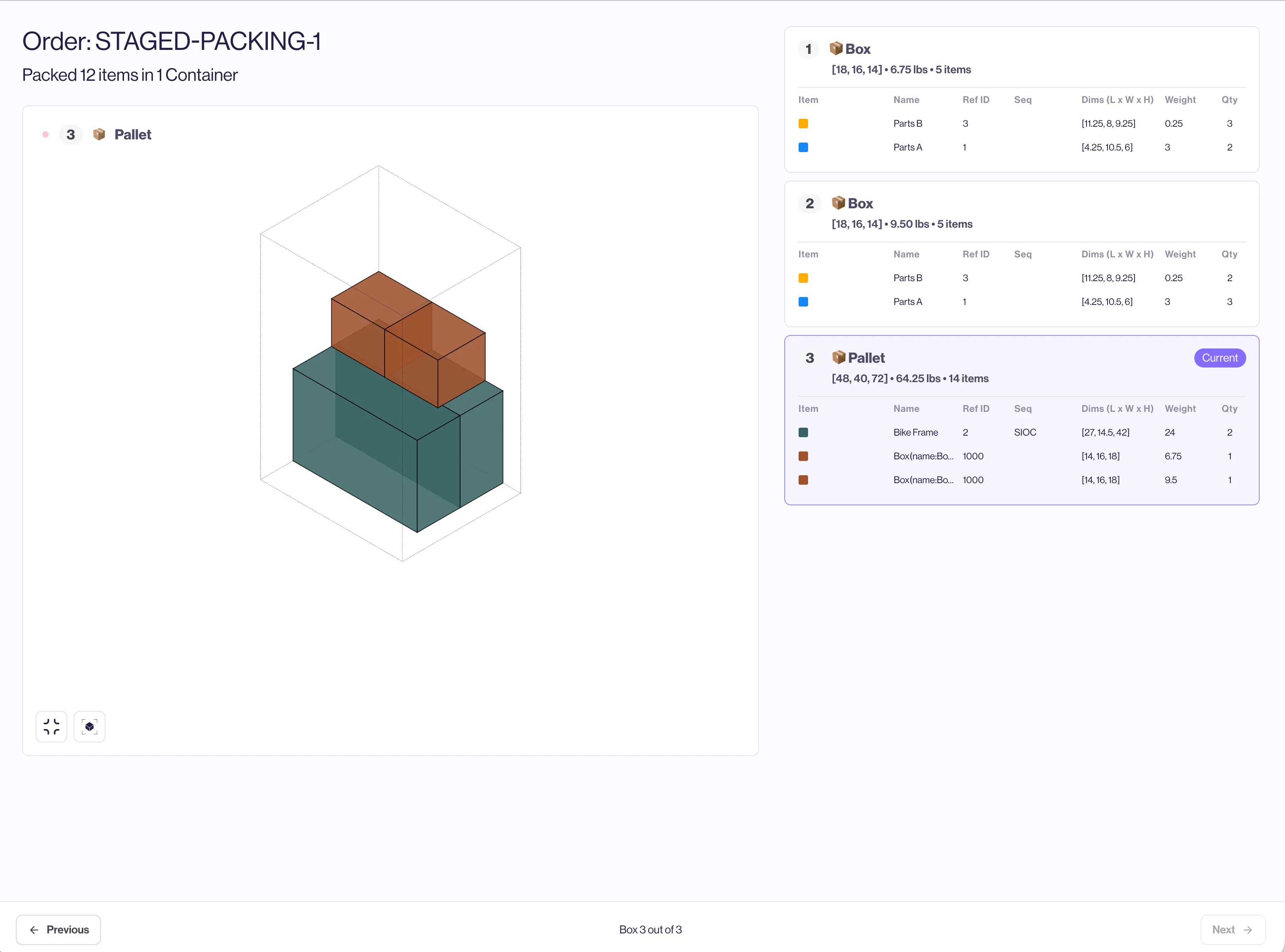
PacAPI responds with information about the boxes as well, including which items went into each box before the boxes were then placed onto the pallet.
Inner Pack / Gift Boxing / Kitting
Another frequent use case that inspired the pack-sequence rule is inner packing, oftentimes presented as gift boxing, kitting, or item bundling. The required behavior is: make sure qualified items are packaged together first (as a kit or gift box), then pack the kit in a carton that can be shipped.
The solution to this use case was developed along with our partners at Packsize — they had a customer that needed right-sized kit boxing that would then be placed into a right-sized shipping box. This added an additional requirement to consider: the outer dimensions of the generated inner kit boxes, in order to make the properly sized outer when the kit is placed with other items.
Let’s construct this example. We’ll use an electronic device and its power supply that need to be packed together as a kit item, and then ship the kit along with another item in a shippable box.
We will use our boxTypeGenerator to create the right-sized kit, and then use a standard RSC box for shipping.
Let’s start by creating our items:
{
	"itemSets": [
	    {
	      "refId": 1,
	      "quantity": 1,
	      "dimensions": {
	        "z": 10.5,
	        "y": 4.25,
	        "x": 3
	      },
	      "weight": 3,
	      "name": "Device",
	      "color": "#1488f5",
	      "sequence": "kit-bundle-A"
	    },
	    {
	      "refId": 2,
	      "quantity": 1,
	      "dimensions": {
	        "x": 2,
	        "y": 3,
	        "z": 4
	      },
	      "weight": 0.3,
	      "name": "Device Power",
	      "color": "#3b6667",
	      "sequence": "kit-bundle-A"
	    },
	    {
	      "refId": 3,
	      "quantity": 3,
	      "dimensions": {
	        "x": 3,
	        "y": 4,
	        "z": 7
	      },
	      "weight": 0.25,
	      "name": "Accessories",
	      "color": "#ffae00"
	    }
	  ]
  }
In this example, we’re using the sequence attribute to hold our flag for kitting — set to "kit-bundle-A" . This will be used when creating our exclude rules.
Next we will set up our custom kit boxTypeGenerator and add a shipping outer box.
{
	"boxTypeGenerators":[
		{
			"boxTypeDefaults":{
				"name":"PROMO-KIT-2026",
				"refId":2000,
				"weightMax":10,
				"outer": {
		      "dimensionChange": {
		        "x": 0.33,
		        "y": 0.33,
		        "z": 0.33
		      }
		    }
			},
			"operation": "cartesian",
      "options": {
        "xRange": {
          "min": 2,
          "max": 10
        },
        "yList": [4, 6, 8, 10],
        "zList": [8, 10, 12]
      }
		}
	],
	"boxTypes":[
		{
      "refId": 11,
      "name": "Medium Box",
      "weightMax": 50,
      "dimensions": {
        "x": 8,
        "y": 10,
        "z": 13
      }
    }
	]
}
Worth noting here: in the boxTypeDefaults for the kit box, we’ve defined an outer behavior that will add 0.33 to the generated dimensions in order to accommodate for the width the cardboard when the kit needs to be packed. We’re also using a mix of xRange along with the yList and zList to control the footprint of the kit box a bit more.
Now its time to set up the rules for pack-sequence and routing the items correctly.
{
"rules": [
   {
     "operation": "exclude",
     "itemMatch": {
       "property": "sequence",
       "expression": "kit-bundle"
     },
     "targetBoxMatch": {
      "property": "name",
      "expression":"PROMO-KIT",
      "negate":true
     },
     "ignoreSubspaces": true
     "comment":"ensure kit items cannot be placed in anything aside from kit box"
   },
   {
     "operation": "exclude",
     "itemMatch": {
       "property": "sequence",
       "expression": "kit-bundle",
       "negate":true
     },
     "targetBoxMatch": {
      "property": "name",
      "expression":"PROMO-KIT"
     },
     "comment":"non-kit items are excluded from kit box"
   },
   {
     "operation": "pack-sequence",
     "itemMatch": {
       "property": "sequence",
       "expression": "kit-bundle"
     },
     "options": {
       "index": 0,
       "comment": "kit items first",
       "reduce": "box-to-item",
       "reducedRefId": 1000
     }
   }
 ]
 }
There are 3 rules above, and they go as follows:
- Exclude: The first exclude rule is assigned to items that are kittable (sequence property “kit bundle”) and excludes them from being packed into boxes that are not the “PROMO-KIT” box, unless they are part of a subspace (the ignoreSubspaces option being set to true means that once kitted, these items can be packed into other boxes)
- Exclude: The second exclude rule is set to prevent non-kittable items (without “kit-bundle” in their sequence) from using the “PROMO-KIT” boxTypeGenerator.
- Pack-Sequence: Assigned to items with “kit-bundle” in the sequence, this rule will convert the kit box to an item (the "reduce":"box-to-item" setting) with the refId of 1000 — setting "reducedRefId":1000 makes this happen.
View the combined payload of Items, Boxes, Rules, and BoxTypeGenerators below:
{
  "orderId":"STAGED-PACKING-2",
  "itemSets": [
    {
      "refId": 1,
      "quantity": 1,
      "dimensions": {
        "z": 10.5,
        "y": 4.25,
        "x": 3
      },
      "weight": 3,
      "name": "Device",
      "color": "#1488f5",
      "sequence": "kit-bundle-A"
    },
    {
      "refId": 2,
      "quantity": 1,
      "dimensions": {
        "x": 2,
        "y": 3,
        "z": 4
      },
      "weight": 0.3,
      "name": "Device Power",
      "color": "#3b6667",
      "sequence": "kit-bundle-A"
    },
    {
      "refId": 3,
      "quantity": 3,
      "dimensions": {
        "x": 3,
        "y": 4,
        "z": 7
      },
      "weight": 0.25,
      "name": "Accessories",
      "color": "#ffae00"
    }
  ],
  "boxTypeGenerators": [
    {
      "boxTypeDefaults": {
        "name": "PROMO-KIT-2026",
        "refId": 2000,
        "weightMax": 10,
        "outer": {
          "dimensionChange": {
            "x": 0.33,
            "y": 0.33,
            "z": 0.33
          }
        }
      },
      "operation": "cartesian",
      "options": {
        "xRange": {
          "min": 2,
          "max": 10
        },
        "yList": [
          4,
          6,
          8,
          10
        ],
        "zList": [
          8,
          10,
          12
        ]
      }
    }
  ],
  "boxTypes": [
    {
      "refId": 11,
      "name": "Medium Box",
      "weightMax": 50,
      "dimensions": {
        "x": 8,
        "y": 10,
        "z": 13
      }
    }
  ],
  "rules": [
    {
      "operation": "exclude",
      "itemMatch": {
        "property": "sequence",
        "expression": "kit-bundle"
      },
      "targetBoxMatch": {
        "property": "name",
        "expression": "PROMO-KIT",
        "negate": true
      },
      "ignoreSubspaces": true,
      "comment": "ensure kit items cannot be placed in anything aside from kit box"
    },
    {
      "operation": "exclude",
      "itemMatch": {
        "property": "sequence",
        "expression": "kit-bundle",
        "negate": true
      },
      "targetBoxMatch": {
        "property": "name",
        "expression": "PROMO-KIT"
      },
      "comment": "non-kit items are excluded from kit box"
    },
    {
      "operation": "pack-sequence",
      "itemMatch": {
        "property": "sequence",
        "expression": "kit-bundle"
      },
      "options": {
        "index": 0,
        "comment": "kit items first",
        "reduce": "box-to-item",
        "reducedRefId": 1000
      }
    }
  ]
}
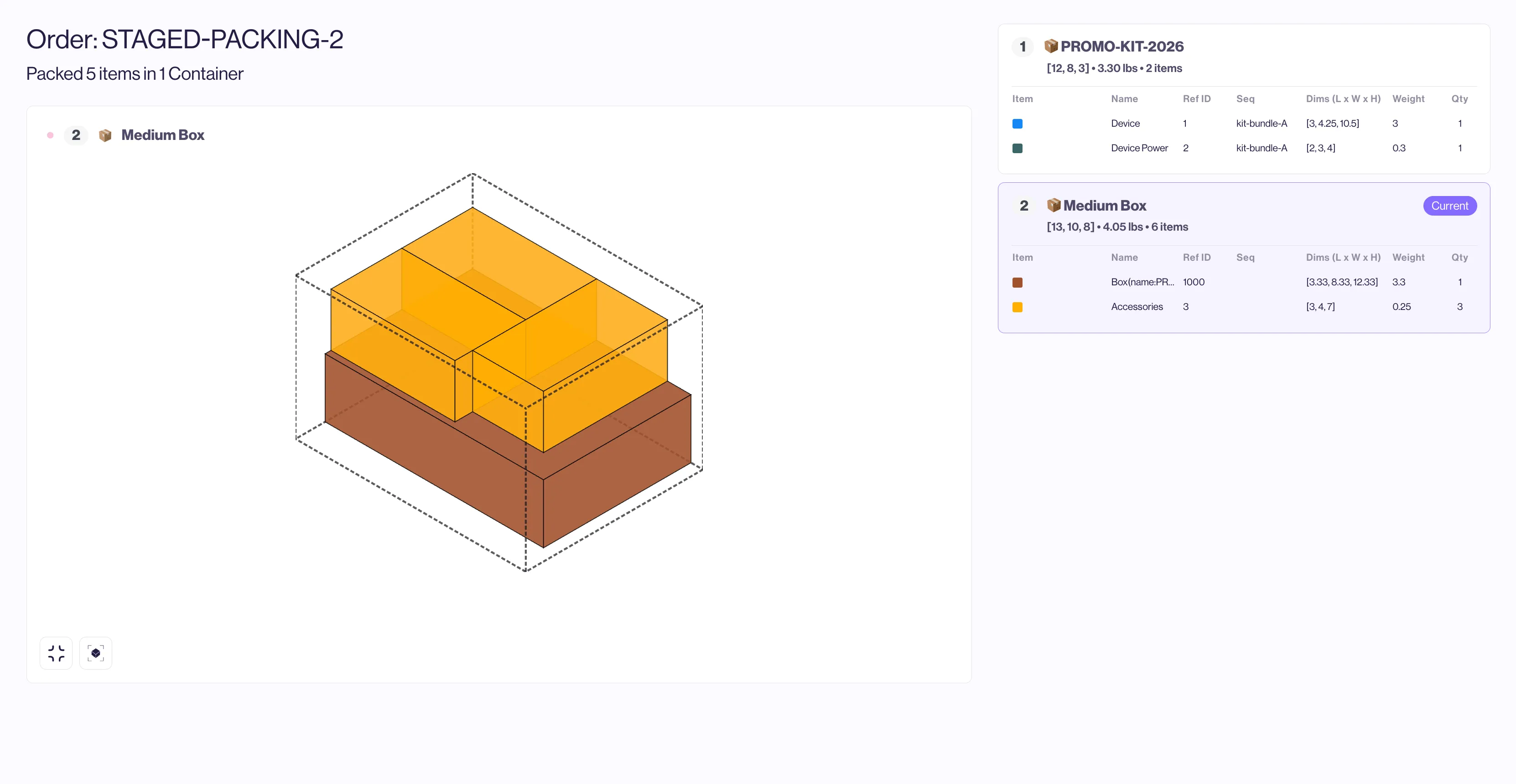
Using our Inspector tool, we can see that everything packs into one outer box
Here is the full example request and response, embedded:
Our API response includes two boxes: the PROMO-KIT-2026 box as well as the Medium Box. This is important for any automation that will need to generate the inner box, as well as for packers who need to see the contents of the kit box.
In the response, we can see that the PROMO-KIT-2026 box has inner dimensions of 12, 8, and 3. Taking a look at the contents of the Medium Box — we can see that the dimensions of the Kit item have in fact used our outer dimension adjustments; as an item its dimensions are 12.33, 8.33, and 3.33.
Items to Box to Pallet To Truck
A more advanced application of pack-sequence is an extension of our first example — once items are placed into boxes, and those boxes placed onto pallets, we can take it one step further and place those pallets onto a truck.
"itemSets": [
    {
      "refId": 1,
      "quantity": 600,
      "dimensions": {
        "z": 10.5,
        "y": 4.25,
        "x": 6
      },
      "weight": 2.97,
      "name": "Parts",
      "color": "#1488f5",
      "sequence": "UN"
    },
    {
      "refId": 2,
      "quantity": 500,
      "dimensions": {
        "x": 17.75,
        "y": 5,
        "z": 7.75
      },
      "weight": 20.5,
      "name": "More Parts",
      "color": "#27f40b",
      "sequence": "UN"
    },
    {
      "refId": 3,
      "quantity": 400,
      "dimensions": {
        "x": 0.25,
        "y": 14.5,
        "z": 6.5
      },
      "weight": 14.25,
      "name": "Extra Parts",
      "color": "#f0149f",
      "sequence": "UN"
    },
    {
      "refId": 99,
      "quantity": 1,
      "dimensions": {
        "x": 0,
        "y": 0,
        "z": 0
      },
      "weight": 0,
      "name": "STEP_FORCE_1",
      "color": "#000000"
    }
  ]
Here we have 3 types of parts, along with a virtual item with no dimensions or weight. We can set up our rules as we usually do; exclusions for specific box types, plus the pack-sequence rules for the parts. One additional step in the packing sequence is required to turn the pallets into items to then be placed on a truck, and that is where the virtual item is used.
{
 "rules": [
    {
      "operation": "exclude",
      "itemMatch": {
        "property": "sequence",
        "expression": "UN"
      },
      "targetBoxRefIds": [
        200,
        300
      ],
      "ignoreSubspaces": true
    },
    {
      "operation": "exclude",
      "itemRefId": 100,
      "targetBoxRefIds": [
        100,
        300
      ],
      "ignoreSubspaces": true
    },
    {
      "operation": "exclude",
      "itemRefId": 200,
      "targetBoxRefIds": [
        100,
        200
      ],
      "ignoreSubspaces": true
    },
    {
      "operation": "pack-sequence",
      "itemMatch": {
        "property": "sequence",
        "expression": "UN"
      },
      "options": {
        "index": 0,
        "comment": "box-to-pallet",
        "reduce": "box-to-item",
        "reducedRefId": 100
      }
    },
    {
      "operation": "pack-sequence",
      "itemMatch": {
        "property": "name",
        "expression": "STEP_FORCE_1"
      },
      "options": {
        "index": 1,
        "comment": "pallet-to-truck",
        "reduce": "box-to-item",
        "reducedRefId": 200
      }
    }
  ]
  }
The two "pack-sequence" rules are setup like so:
- The parts (”sequence”:”UN”) put the generated boxes onto pallets, much like our first example. With the pallets generated, we need to turn them into items so they can be put onto our truck boxType
- The “STEP_FORCE_1” virtual item tells the API that we now have another pack-sequence at "index":1 which looks at the pallets output from "index":0, and has to pack them somewhere else along with the virtual item.
These are the boxTypes and generators we use — the additional “exclude” rules in the snippet above are used to route items to their proper box type — parts into boxes, generated boxes onto pallets, then those pallets into the trucks.
{"boxTypes": [
    {
      "refId": 100,
      "weightMax": 150,
      "name": "Box",
      "dimensions": {
        "x": 14,
        "y": 16,
        "z": 18
      }
    },
    {
      "refId": 300,
      "weightMax": 44000,
      "name": "Truck",
      "dimensions": {
        "x": 102,
        "y": 102,
        "z": 630
      }
    }
  ],
  "boxTypeGenerators": [
    {
      "boxTypeDefaults": {
        "name": "pallet",
        "refId": 200,
        "weightMax": 4000,
        "weightTare": 35
      },
      "operation": "cartesian",
      "options": {
        "xRange": {
          "min": 10,
          "max": 91.5
        },
        "yList": [
          42
        ],
        "zList": [
          50
        ]
      }
    }
  ]
  }
Putting the entire payload together looks like this:
{
  "orderId": "STAGED-PACKING-3",
  "rules": [
    {
      "operation": "exclude",
      "itemMatch": {
        "property": "sequence",
        "expression": "UN"
      },
      "targetBoxRefIds": [
        200,
        300
      ],
      "ignoreSubspaces": true
    },
    {
      "operation": "exclude",
      "itemRefId": 100,
      "targetBoxRefIds": [
        100,
        300
      ],
      "ignoreSubspaces": true
    },
    {
      "operation": "exclude",
      "itemRefId": 200,
      "targetBoxRefIds": [
        100,
        200
      ],
      "ignoreSubspaces": true
    },
    {
      "operation": "pack-sequence",
      "itemMatch": {
        "property": "sequence",
        "expression": "UN"
      },
      "options": {
        "index": 0,
        "comment": "box-to-pallet",
        "reduce": "box-to-item",
        "reducedRefId": 100
      }
    },
    {
      "operation": "pack-sequence",
      "itemMatch": {
        "property": "name",
        "expression": "STEP_FORCE_1"
      },
      "options": {
        "index": 1,
        "comment": "pallet-to-truck",
        "reduce": "box-to-item",
        "reducedRefId": 200
      }
    }
  ],
  "boxTypeGenerators": [
    {
      "boxTypeDefaults": {
        "name": "pallet",
        "refId": 200,
        "weightMax": 4000,
        "weightTare": 35
      },
      "operation": "cartesian",
      "options": {
        "xRange": {
          "min": 10,
          "max": 91.5
        },
        "yList": [
          42
        ],
        "zList": [
          50
        ]
      }
    }
  ],
  "itemSets": [
    {
      "refId": 1,
      "quantity": 600,
      "dimensions": {
        "z": 10.5,
        "y": 4.25,
        "x": 6
      },
      "weight": 2.97,
      "name": "Parts",
      "color": "#1488f5",
      "sequence": "UN"
    },
    {
      "refId": 2,
      "quantity": 500,
      "dimensions": {
        "x": 17.75,
        "y": 5,
        "z": 7.75
      },
      "weight": 20.5,
      "name": "More Parts",
      "color": "#27f40b",
      "sequence": "UN"
    },
    {
      "refId": 3,
      "quantity": 400,
      "dimensions": {
        "x": 0.25,
        "y": 14.5,
        "z": 6.5
      },
      "weight": 14.25,
      "name": "Extra Parts",
      "color": "#f0149f",
      "sequence": "UN"
    },
    {
      "refId": 99,
      "quantity": 1,
      "dimensions": {
        "x": 0,
        "y": 0,
        "z": 0
      },
      "weight": 0,
      "name": "STEP_FORCE_1",
      "color": "#000000"
    }
  ],
  "boxTypes": [
    {
      "refId": 100,
      "weightMax": 150,
      "name": "Box",
      "dimensions": {
        "x": 14,
        "y": 16,
        "z": 18
      }
    },
    {
      "refId": 300,
      "weightMax": 44000,
      "name": "Truck",
      "dimensions": {
        "x": 102,
        "y": 102,
        "z": 630
      }
    }
  ]
}
All 1501 items are packed onto a single truck
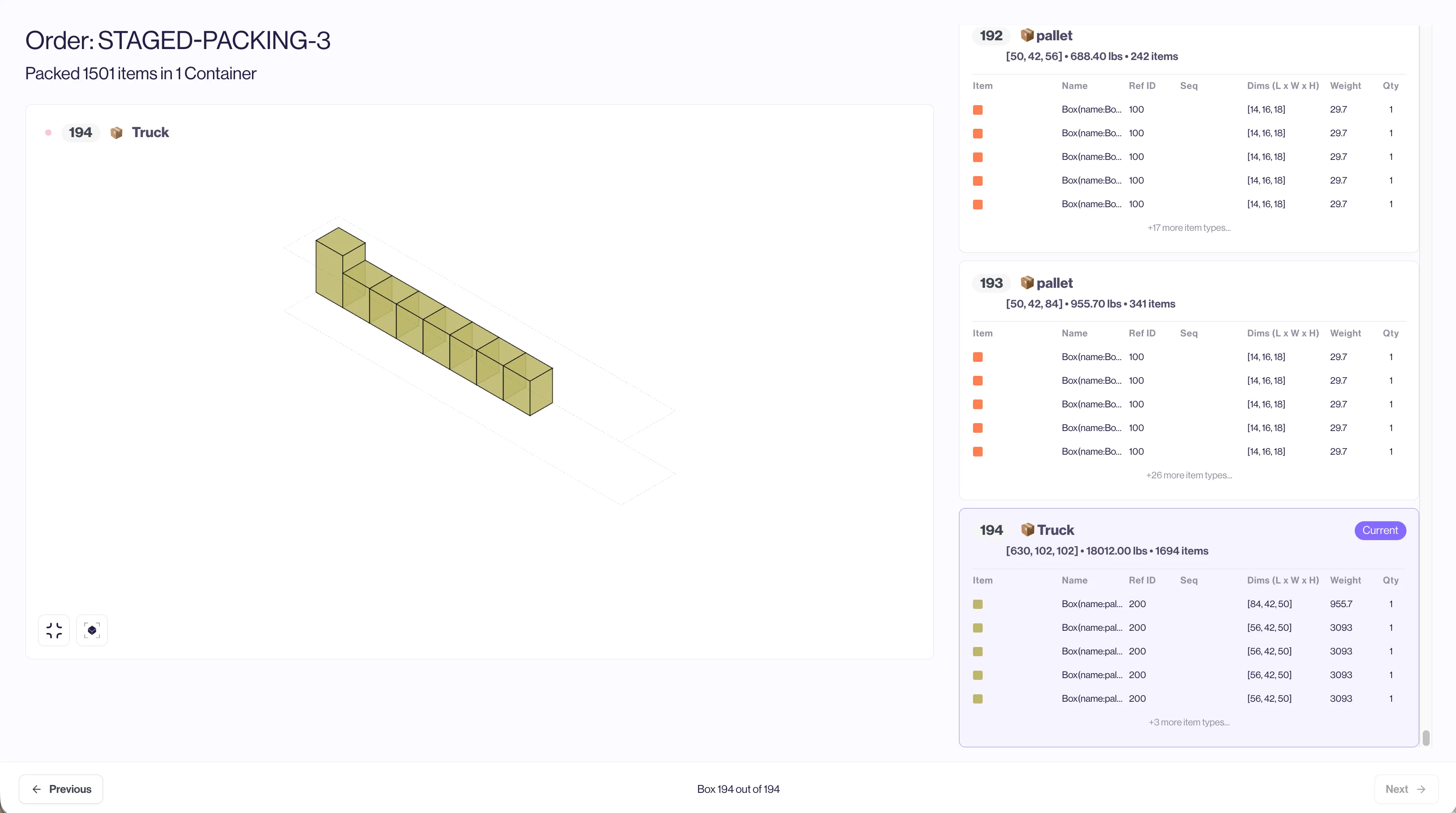
Our Inspector tool returns the pack as below:
Conclusion
- pack-sequence enables staged packing in a single PacAPI request, removing the need to chain multiple requests for inner → outer workflows.
- The rule’s index, key, and reduce options define how stages run and how outputs become inputs, including powerful patterns like boxes-to-items (kitting, inner/outer) and preserving identities via reducedRefId.
- Real-world patterns are supported end-to-end: carton → pallet with SIOC routing, inner kit boxing with BTG and outer dimension adjustments, and multi-hop flows like items → box → pallet → truck using a forced step item.